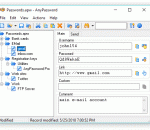
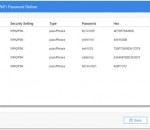
AnyPassword is a tiny utility for keeping your passwords. Protect all your private data with a strong encryption and hold in mind one password instead of dozens. A tree structure and an advanced search allow you to get passwords quickly whenever you need. Need new passwords? A built-in password generator creates them on a given mask. A neatly organized interface of the program supports several languages.
Free File Wiper is a small, easy to use application specially designed to help you delete files securely. Just drag and drop directories and files on the trashcan and the software will erase them completely. The files will be overwritten with standard and random patterns. After the wipe, the files cannot be undeleted and restored.
The most noteworthy feature of Advanced Encryption Package Professional may be its flexibility: Not only can you encrypt files for your own protection but you can easily create "self-decrypting" versions of your files that others can run without needing Advanced Encryption Package Professional or any decryption software.
Program can hash data from keyboard, file or CD/DVD by Adler32, CRC32, CRC64, GOST, HAVAL, MD2, MD4, MD5, MD6, SHA-0, SHA-1, SHA-1-IME, SHA-224, SHA-256, SHA-384, SHA-512, RIPEMD-128, RIPEMD-160, RIPEMD-256, RIPEMD-320, TIGER or Whirlpool algorithm.
AnyPassword Pro is an advanced password guarding solution, which stores passwords in systematized folders and protects all data with a strong encryption method. Database synchronization and an ability to attach files to password records will be very precious for experienced users. File data compression saves space, which is quite important while installing the program onto a portable device. The program supports several languages.
Protect Folder encrypts folders or entire removable drives on the fly with no extra software required to access or modify protected data. Save your time and effort by entering a password just once to lock or unlock the entire USB drive! Keep your files and folders completely secure while you are traveling. Lock or unlock all protected drives and folders at once with a single hot-key. Bring your data with you conveniently and securely!
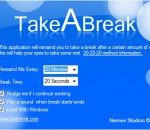
This application simply pops up a message after a specific amount of minutes passed (by default 20 minutes), the message tells the user to "Take a break" - this message continues to appear until the break time ends. When the break time ends, the computer will play a sound and turn the screen back on to let the user know the break time is over and he can now use his computer again, until the next break.